Precalculated attributes
This recipe explains how to target contexts based on calculated values that LaunchDarkly’s built-in operators cannot express directly.
Use case
You want to target users based on relative time periods or calculated metrics. For example:
- Users who logged in more than 90 days ago
- Users whose subscription expires within 7 days
- Users with an account balance below a threshold percentage
LaunchDarkly provides before and after operators for date comparisons. These operators require absolute dates as arguments. There are no operators for relative date comparisons or mathematical calculations.
Solution
Precalculate the derived value in your application and pass it to LaunchDarkly as a context attribute. Your application code performs the calculation before the SDK evaluates any flags.
The pattern follows these steps:
- Calculate the value in your application code when building the context.
- Add the calculated value as a custom attribute on the context.
- Create targeting rules using standard numeric operators.
Example: days since last login
Your application calculates the number of days between the current date and the user’s last login date. Store this value as daysSinceLastLogin on the context.
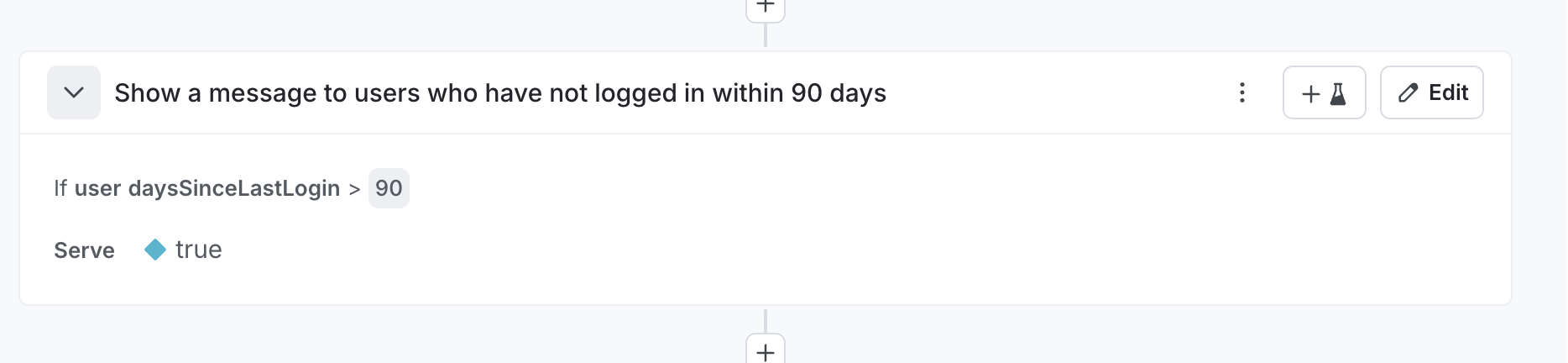
In LaunchDarkly, create a targeting rule that checks if daysSinceLastLogin is greater than 90. The flag serves users who have not logged in for more than 90 days.
The following screenshot shows a targeting rule using the precalculated daysSinceLastLogin attribute:
Other examples
This pattern applies to many scenarios:
daysUntilExpiration- target users whose subscriptions expire soonstorageUsedPercent- target users approaching storage limitslifetimeSpend- target high-value customers for loyalty programsdistanceToNearestStore- target users far from physical locationsfeaturesUsedCount- target users who might benefit from plan upgradesriskScore- target based on fraud or churn risk calculated from multiple signals
When to use this pattern
This pattern applies when your targeting logic requires:
- Relative date comparisons instead of absolute dates
- Mathematical operations like subtraction, addition, or percentage calculations
- Derived values that combine multiple source fields
- Complex business logic that cannot map to built-in operators
Considerations
Calculate the attribute value at the appropriate point in your application. For server-side applications, calculate the value when constructing the context before flag evaluation. For client-side applications, calculate the value before initializing the SDK.
Keep attribute names descriptive. Names like daysSinceLastLogin communicate the attribute’s purpose clearly.